
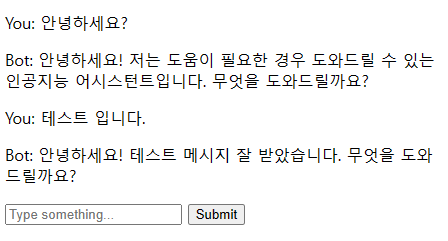
Python, Flask 를 이용해서 ChatGPT API 를 사용하는 간단한 예제입니다.
아래 OpenAI 사이트에서 API를 신청한 후 사용 가능합니다.
app.py 에서 "your-openai-api-key"를 OpenAI 에서 발급받은 API 로 변경하시면 됩니다.
https://platform.openai.com/overview
OpenAI Platform
Explore developer resources, tutorials, API docs, and dynamic examples to get the most out of OpenAI's platform.
platform.openai.com
라이브러리 설치
$ pip install flask openai
디렉토리구조
project/
├─ app.py
└─ templates/
   └─ index.html
app.py
from flask import Flask, request, jsonify, render_template
import openai

app = Flask(__name__)

openai.api_key = "your-openai-api-key"

# POST 요청 처리
@app.route('/api/message', methods=['POST'])
def message():
    # JSON 데이터 가져오기
    data = request.get_json()
    message = data.get('message', '')

    # OpenAI API로부터 응답 받기
    response = openai.ChatCompletion.create(
        model="gpt-3.5-turbo",
        messages=[
            {"role": "system", "content": "You are a helpful assistant."},
            {"role": "user", "content": message},
        ],
    )

    # JSON 형태로 응답 보내기
    return jsonify({'message': response['choices'][0]['message']['content']})

# 홈 페이지 렌더링
@app.route('/')
def home():
    return render_template('index.html')

# 앱 실행
if __name__ == '__main__':
    app.run(debug=True)
templates/index.html
<!DOCTYPE html>
<html>
<head>
    <title>Chat with GPT</title>
</head>
<body>
    <div id="chat-box"></div>
    <input type="text" id="user-input" placeholder="Type something...">
    <button id="submit-btn">Submit</button>

    <script>
        document.getElementById('submit-btn').addEventListener('click', function() {
            var userInput = document.getElementById('user-input').value;
            var chatBox = document.getElementById('chat-box');
            chatBox.innerHTML += '<p>You: ' + userInput + '</p>';
            document.getElementById('user-input').value = '';

            fetch('/api/message', {
                method: 'POST',
                headers: {
                    'Content-Type': 'application/json',
                },
                body: JSON.stringify({
                    'message': userInput
                }),
            })
            .then(response => response.json())
            .then(data => {
                chatBox.innerHTML += '<p>Bot: ' + data.message + '</p>';
            });
        });
    </script>
</body>
</html>
실행
$ python app.py'Programming > Python' 카테고리의 다른 글
| Flask, MySQL 세션를 이용한 로그인/로그아웃 예제 (0) | 2023.06.28 |
|---|---|
| CCTV 라이브 이미지 다운로드 (0) | 2023.06.19 |
| Python, Docker, Compose, Nginx, Flask, Gunicorn 연동하기 (0) | 2023.06.15 |
| 이미지에서 특정 색상 범위 비율 검출 (1) | 2023.06.12 |